
 Annotation practice
Video annotation: a practical guide
A practical guide to video annotation: tracking, interpolation, event labelling, quality checks and tool selection.

Sahil Wadhwa
· 5 min read
- Annotation practice
- Video Annotation
- Object Tracking
- Annotation QA
Contents
Executive summary
Video annotation is the work of labelling objects, movements, and events through frames so a model can learn how things change over time. A good video annotation tool keeps each object’s identity through frames, fills in the frames between keyframes, suggests tracks automatically, and lets reviewers check the whole sequence, not just single images.
What is video annotation, and how is it different from image annotation?
Image annotation asks what is in this picture. Video annotation asks what is in this scene, where it goes, and what it does. The extra dimension is time, and time changes the job.
Three things make video labelling harder than labelling still images:
- Volume: at 30 frames per second, one minute of footage holds 1,800 frames. Labelling each frame by hand is rarely realistic.
- Identity: the same person or vehicle must keep one ID from the first frame to the last, even when it is hidden for a moment.
- Events: many video tasks concentrate on actions, such as a fall, a lane change, or a hand extending toward a part, that have a start and an end in time.
If you already work with image segmentation or boxes, the shapes will feel familiar. What a video annotation tool adds is the machinery to carry those shapes through time without redrawing them on every frame.
What are the common types of video annotation?
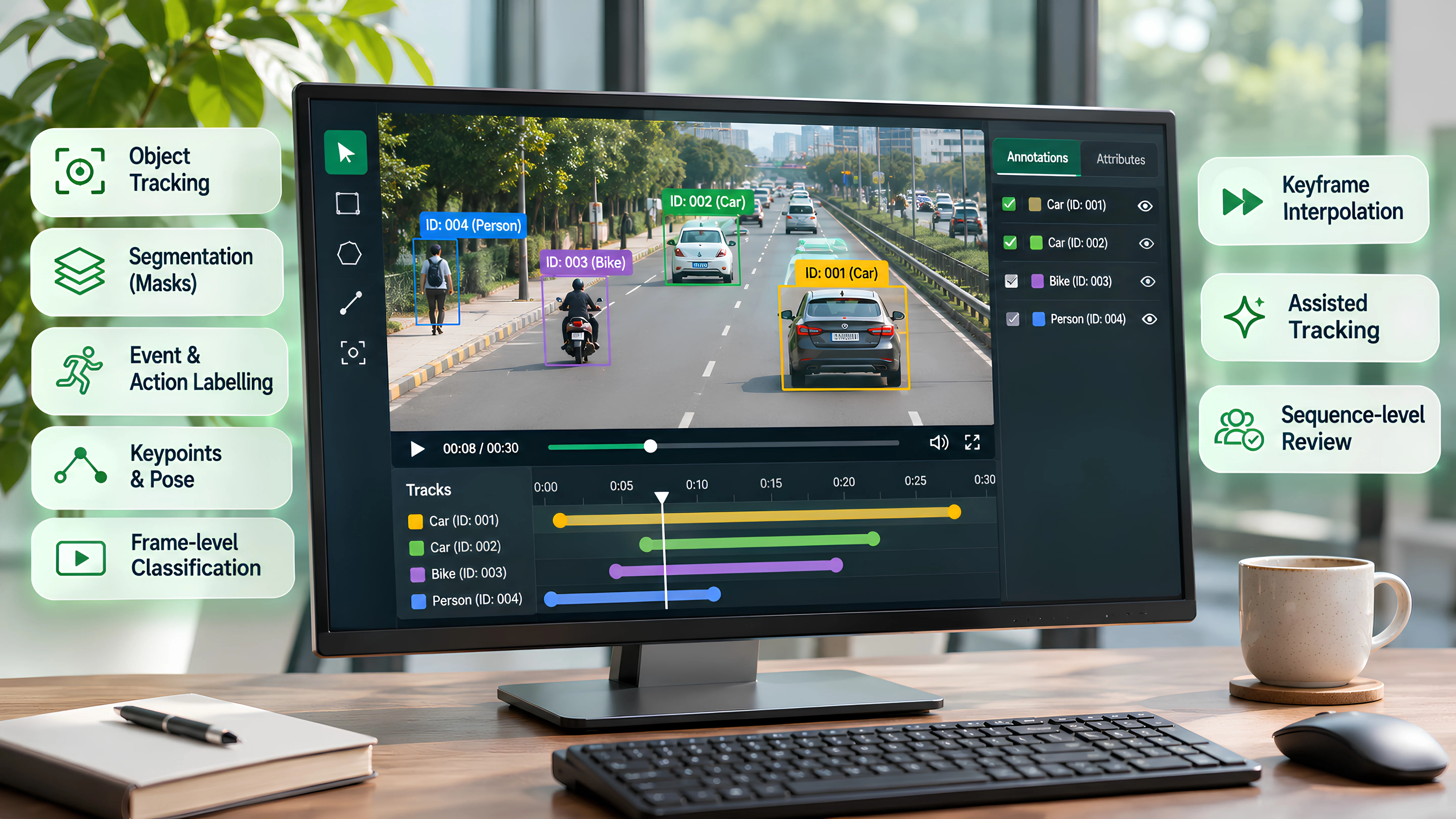
- Object tracking: a box, polygon, or mask follows one object through frames with a persistent ID. Used in traffic analysis, retail, sports, and robotics.
- Frame-level classification: each frame or clip gets a tag, such as day or night, safe or unsafe. Fast and useful for filtering footage.
- Event and action labelling: time segments marked with a start, an end, and a class and used in safety monitoring, surgical video, and driver behaviour.
- Keypoints and pose: joints or landmarks tracked over time, for movement analysis and gesture recognition.
- Segmentation in video: pixel masks carried over frames, for tasks where shape changes matter.
Most real projects mix two or three of these. A warehouse safety dataset, for example, may track each worker, label each near miss as an event, and tag each clip by shift.
What should a video annotation tool do?
When you compare options, the useful questions are about speed through frames and control over identity. A capable video annotation tool should offer:
- Keyframe interpolation: you label an object on a few frames and the tool fills in the frames between, which you then correct.
- Assisted tracking: a model proposes the object path, and a person accepts or fixes it.
- Persistent object IDs: one identity per object for the whole video, with clear handling when objects leave and return.
- Shape and track modes: a single shape on one frame, or a track that lives across many.
- Fluid playback and scrubbing: long videos that load, play, and jump without lag, because annotators judge motion by watching it.
- Sequence-level review: reviewers watch the track play back, not just check single frames.
LabelFort, Predusk’s data annotation platform, supports shape and track modes with persistent object identities, keyframe interpolation, and generative assisted tracking, with trained reviewers checking every track before it is accepted.
Do you need a free video annotation tool or a managed one?
It depends on the project, and it is worth being honest about that. Several open source tools support video annotation and cost nothing to start. For a research project, a prototype, or a small internal dataset of public footage, a free video annotation tool is often the right choice.
Free tools start to strain in four situations:
- Scale: thousands of hours of footage need a trained workforce, not just software.
- Consistency: many annotators over many weeks need guidelines, gold clips, and agreement tracking.
- Sensitive footage: video of patients, customers, or workers carries faces and personal data that must be handled under real controls.
- Evidence: regulated teams need a record of who labelled each track, who reviewed it, and what changed.
A simple test: if the hard part of your project is the software, a free video annotation tool may be enough. If the hard part is people, quality, and proof, you need a platform and a team behind it.
How do you check video annotation quality?
Quality in video labelling fails in ways that single images do not. Watch for:
- ID switches: two objects swap identities after they cross paths.
- Drift: interpolated boxes slowly slide off the object between keyframes.
- Event boundaries: annotators disagree on the exact frame where an action starts or ends.
- Missed frames: objects that appear briefly are never labelled.
The fixes are practical. Use gold clips with known answers, write boundary rules with examples (“the fall starts when the hip drops below the knee”), and measure agreement per class and per event type. On LabelFort, the working target is SLA adherence above 98 per cent, with every label and review decision kept in the audit log.
What changes when the video is sensitive?
Video is often the most personal data a team holds. Surgical recordings, clinic waiting rooms, store cameras, and in-cabin driver footage all show real people. Under India’s DPDP Act, substantive obligations take effect on 13 May 2027, and under the EU AI Act, obligations for high-risk systems apply from 2 December 2027, with documented governance expected over training data.
For this kind of footage, the video annotation tool is only one layer. The other layers are who can see the video and where. LabelFort pairs its platform with trained reviewers on a secure annotation floor in India, where phones, paper, and personal devices are not admitted, and entry and exit are logged. The platform is ISO 27001:2022 certified, SOC 2 aligned, HIPAA-ready, GDPR compliant, and DPDP Act 2023-ready.
A practical checklist before you start
- Define the output first: tracks, events, frame tags, or masks.
- Decide the frame rate you will label at; not every frame needs a human.
- Write boundary rules for events and occlusion, with example clips.
- Pilot on a small set and measure agreement prior to scaling.
- Choose a video annotation tool that fits your hardest constraint: cost, scale, or evidence.
Where LabelFort fits best
For quick experiments on public footage, a free tool will serve you well. LabelFort earns its place when video annotation runs at scale, the footage is sensitive, and the labels need to stand up to a client, an auditor, or a regulator: clinical video, in-cabin monitoring, workplace safety, and self-driving systems.
Video labelling is where small errors multiply across thousands of frames. Choose the annotation type your model needs, and a video annotation tool that preserves identities, timing, and evidence.
Next step
See how LabelFort deals with video annotation at labelfort.ai.
Recommended for you
Annotation practice Annotation practice
 Annotation practice
This is the evidence LabelFort ships by default.
IAA scored per cohort, audit trails on every action, evidence exports mapped to EU AI Act Articles 10 & 12.
Certifications & readiness